Dictation Software for Lawyers: How to Choose the Right Tool

Written by Futsy, founder at Vibe Typer
You're dictating a motion while reviewing exhibits, then discover that the software turned a party's name into a common noun, dropped a citation, and sent the audio to a cloud service nobody at the firm vetted. That's more than a minor inconvenience: it creates editing work, integration risk, and potentially serious confidentiality questions.
Choosing dictation software for lawyers involves two separate decisions. First, can the tool accurately handle legal terminology, names, citations, formatting, and multiple speakers? Second, can your firm justify how it processes confidential client material? Speed matters, but a fast transcript that requires extensive correction or creates an undocumented data trail is a poor legal technology purchase.
The right option depends on your practice. On-device tools prioritize control and offline reliability. Private-cloud systems offer broader workflow support with contractual safeguards. Mainstream AI tools can produce polished text quickly, but they require closer review of processing, retention, access, and training policies. Vibe Typer transcribes in the cloud and processes audio in memory, with no recordings or transcripts on its servers.
Table of contents
- What lawyers actually need from dictation software
- How legal dictation evolved into an AI workflow
- Comparing the leading options side by side
- Confidentiality and privilege under modern AI dictation
- Case management integration and workflow fit
- Real practice scenarios and what each one demands
- Implementation and procurement checklist for firms
- Matching the right tool to your practice
What lawyers actually need from dictation software
Lawyers are buying accuracy and confidentiality as much as speech recognition. A general-purpose app may handle an email adequately, yet struggle with Latin phrases, case names, party names, court terminology, and jurisdiction-specific formatting. A deposition workflow creates a different problem because the firm may need speaker separation, timestamps, exhibit references, and a defensible record of how the material was processed.
Start with the language test. Create a short evaluation script containing the terms your lawyers use, including names of judges, clients, statutes, procedural phrases, and recurring matter-specific vocabulary. Then dictate into the applications where work happens, such as Word, email, a document management system, and a browser-based case platform. A tool that performs well in a clean demonstration but fails inside the firm's real environment isn't ready for production.
Next, classify the data. A lawyer dictating a public-facing article has a different risk profile from one recording litigation strategy, medical details, or settlement positions. Your policy should identify which matters can use shared cloud processing, which require a contractual privacy review, and which must remain on a managed or local device.
Practical rule: Never approve a dictation tool based on accuracy alone. Approve the combination of output quality, data handling, integration, and documented supervision.
The time-savings numbers come from one widely cited survey. A 2017 BigHand analysis found that attorneys using dictation saved an average of 84 minutes per day, equivalent to 351 hours per year, or about 50 additional working days annually. The same analysis estimated about $37,400 in annual billable value under its stated assumptions. BigHand's survey findings are the source for that calculation. Treat it as a reason to test, since a survey can't promise revenue.
For drafting-specific workflows, lawyers can also examine tools that turn structured information into first drafts, such as Ares's personal injury demand letter automation. Dictation and document automation solve different problems, but they can complement each other when the lawyer retains review and approval responsibility.
How legal dictation evolved into an AI workflow
Legal dictation began as a controlled handoff. Attorneys recorded speech on physical media, typists interpreted it, and completed documents returned for review. Firms were buying dictaphones as early as the 1950s, according to Access Legal's history of law firm automation. The process saved attorney time, but it also created delays, chain-of-custody questions, and another point for confidential information to be handled.
The next shift brought transcription closer to the lawyer. The same source picks the 1997 Dragon Dictate release as the point when speech-to-text was good enough for broader law-firm adoption. Desktop voice profiling adapted software to an individual speaker, while local processing reduced the need to transmit recordings outside the firm.
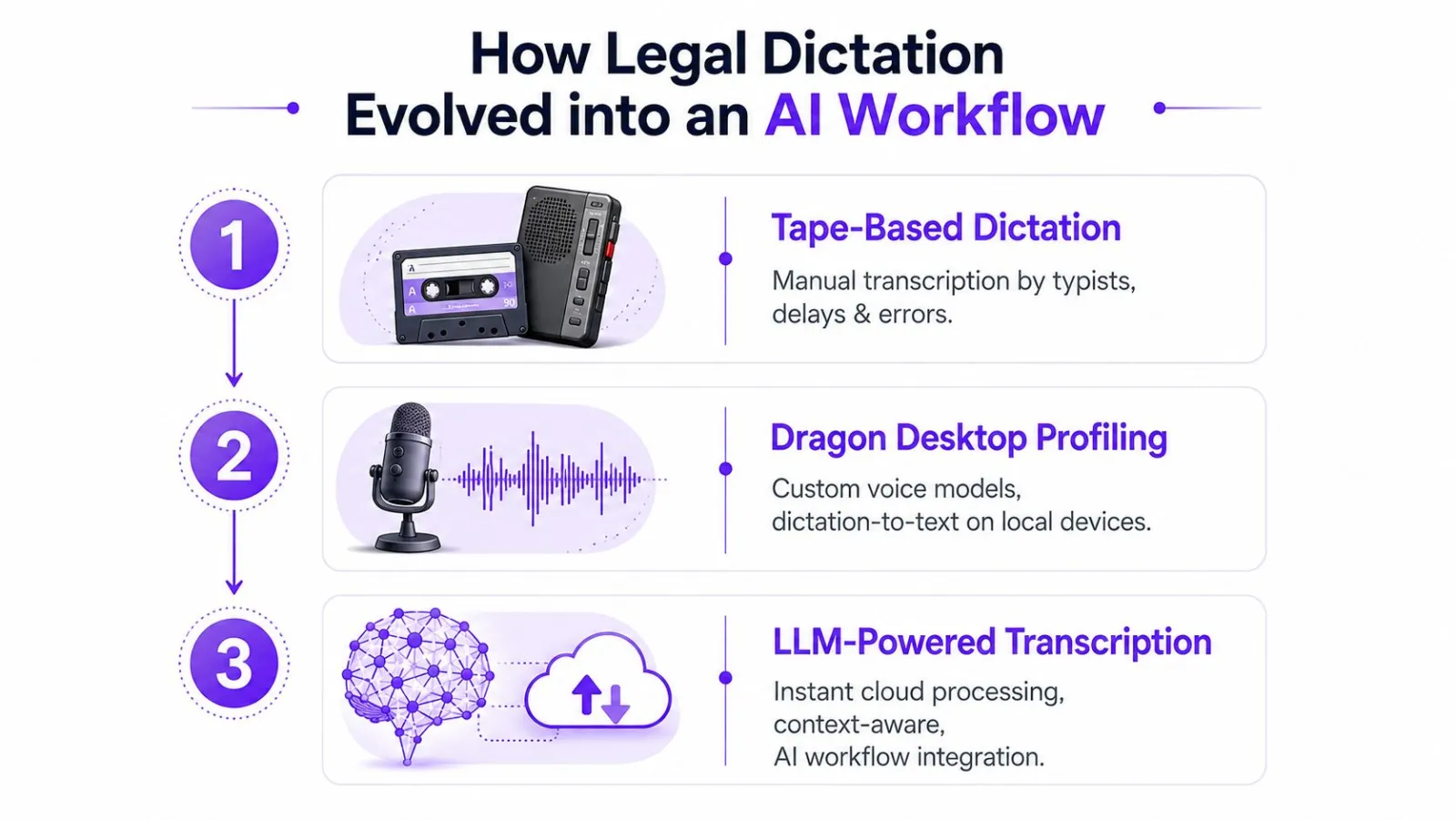
AI changes the job again. Current tools remove filler, repair grammar, apply formatting, and place finished text at the cursor, where older tools left a literal transcript. One recent comparison reported effective speeds of 150 to 180 words per minute for an AI-first tool, compared with 120 to 150 words per minute for Dragon Legal and 80 to 120 words per minute for built-in dictation. The 2026 comparison of legal dictation tools attributes the practical difference to output quality and reduced cleanup more than to speech capture.
That capability turns product selection into a procurement and risk decision. If an AI service processes audio in a shared cloud, the firm must examine infrastructure, retention settings, subprocessors, training controls, audit records, and contractual commitments. Private or local deployment can restrict mobility, yet it may simplify privilege and confidentiality review.
The market now spans legal desktop software, operating-system dictation, cloud transcription, system-wide AI voice typing, and meeting tools for multi-speaker recordings. Choose the workflow, audit requirements, and risk model first. Then select the product that fits them.
Comparing the leading options side by side
The table below sets each tool against what a firm checks first: where the audio goes, legal accuracy, case management fit and platforms. Dragon Professional is Windows only, Word Dictate works only inside Microsoft 365 apps, and Apple Dictation only on Apple devices. For drafting in any app, Vibe Typer is the pick: it types wherever your cursor is, on Linux, Windows and Mac and through its iPhone and Android keyboards. Audio is processed in memory, with no recordings or transcripts on our servers.
The table is a procurement screen to run before a security questionnaire and a live pilot. "Confidentiality posture" describes the type of assessment a firm should make, and no row in it is a blanket approval.
Legal dictation software compared
| Tool | Processing model | Legal accuracy | Case management integration | Platform coverage | Confidentiality posture |
|---|---|---|---|---|---|
| Dragon Professional | Desktop processing options, with cloud offerings depending on deployment | Legal vocabulary after custom dictionary setup; test with your own legal script | Good in supported desktop workflows, but verify each DMS and application | Windows only | Controlled deployment, subject to configuration and contract review |
| Microsoft Word Dictate | Microsoft cloud services connected to Word | Adequate for general drafting, with legal terms requiring testing | Strongest inside Word; broader case-system behavior depends on the application | Windows, macOS, web, and mobile Microsoft environments vary by account | Review tenant controls, retention, access, and data-processing terms |
| Apple Dictation | Apple device and service configuration varies | Useful for short dictation, but specialized legal terminology needs testing | Limited native case-management depth | Apple platforms | Review device settings and service terms, especially for confidential matters |
| Otter for Legal | Cloud transcription | Useful for recorded conversations, but legal vocabulary and speaker separation require validation | Usually export or connector driven rather than deeply native | Web and supported mobile or desktop environments | Cloud retention, access, subprocessors, and training terms require diligence |
| Rev | Cloud transcription or human-assisted workflows depending on service | Can fit reviewed transcription, but test legal formatting and terminology | Primarily file, export, or API workflow | Broad upload and access options | Treat uploaded audio and transcripts as vendor-processed confidential data |
| Speechmatics | Cloud speech-recognition API | Strong candidate for multilingual or API-led testing, with firm-specific validation required | Requires technical integration or middleware | Broad API coverage | Assess processing location, retention, access, and contractual controls |
| Vibe Typer | AI voice typing; in memory, no recordings or transcripts on our servers | Its dictionary keeps names and jargon spelled right; test with your own legal script | Types at the cursor in any app; test your DMS fields | Linux, Windows, macOS, iOS, and Android | Review the firm's matter policy and vendor terms. Nothing trains on your voice or text. |
Dragon Legal's product materials say its legal vocabulary was trained on more than 400 million words from legal documents, and Nuance claims it is 3x faster than typing for legal drafting. Those are vendor claims, so test them against your firm's terminology and editing habits before relying on them. Dragon Legal's official product page lists those claims.
For a practical Windows-focused comparison, review this guide to dictation software for Windows, then validate every shortlisted tool in your own applications. The decisive question is which one produces usable text in the places your lawyers already work without creating an unacceptable data trail.
Confidentiality and privilege under modern AI dictation
"Cloud" and "local" are useful starting labels, but they don't answer the privilege question. A vendor may advertise encryption or zero retention while leaving the firm uncertain about subprocessors, administrator access, temporary processing copies, contractual deletion, or model-training restrictions.
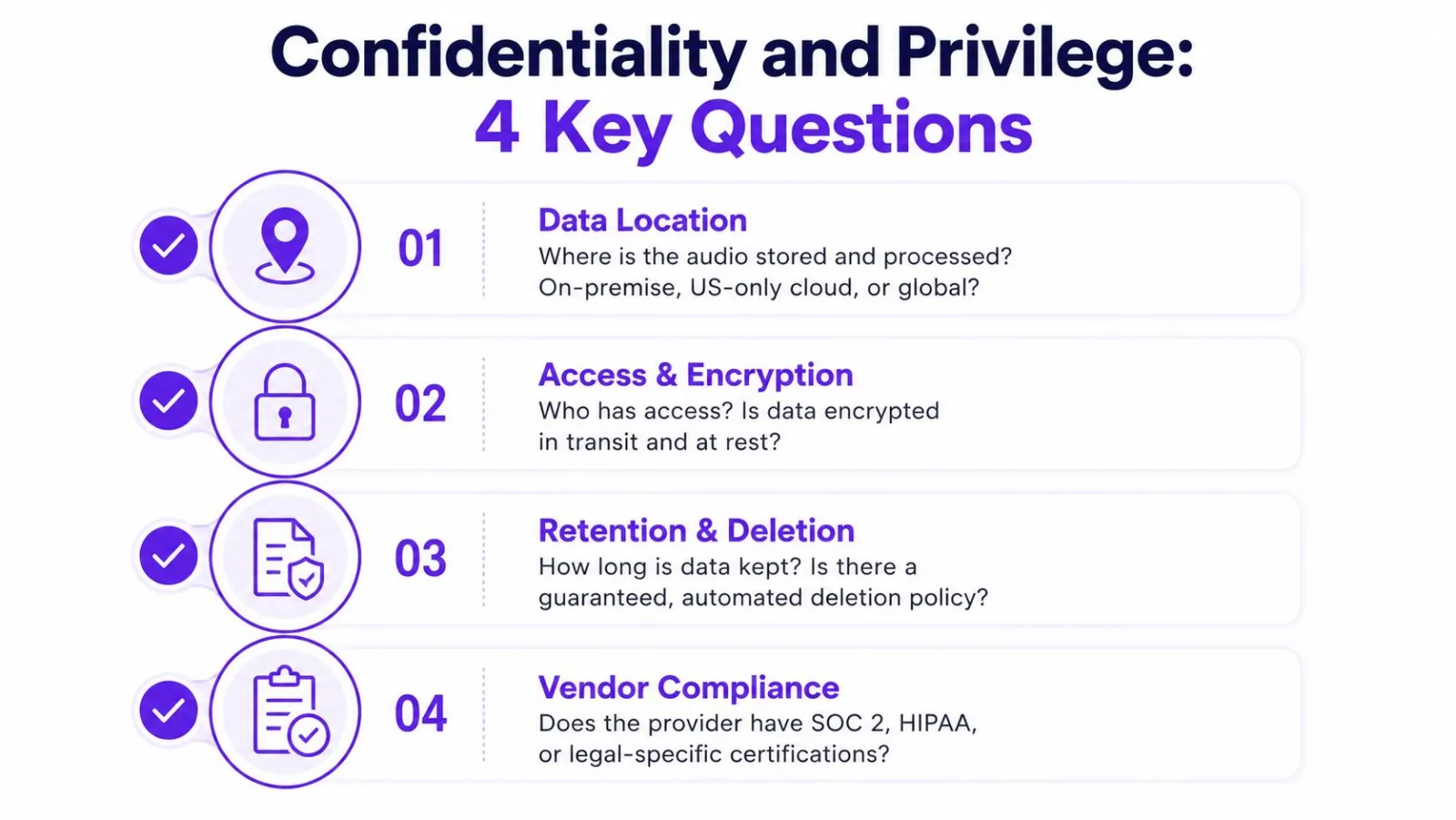
Ask four questions before any confidential dictation reaches the service:
- Where is the audio processed? Determine whether processing occurs on the device, in a dedicated private cloud, or in a shared service environment. Location can affect vendor assessment, client requirements, and jurisdictional analysis.
- What remains afterward? Ask whether raw audio, intermediate files, transcripts, logs, and backups are retained, and whether deletion is automatic or merely available on request.
- Who can access it? Identify vendor personnel, support teams, administrators, subprocessors, and any access-monitoring controls.
- Is the data used for training? Require a clear contractual answer about audio, transcripts, metadata, prompts, and derived data.
On-device processing reduces exposure because the audio doesn't need to travel to a shared transcription provider. The trade-off is practical. Local tools may offer less mobility, weaker cross-device continuity, and fewer AI formatting features. Cloud tools can be acceptable for some firms, but only after the firm documents its risk assessment, service terms, access controls, retention settings, and applicable professional obligations.
UK firms should account for the Solicitors Regulation Authority Code of Conduct, GDPR, and Data Protection Act 2018 when a transcription provider handles legal work. The provider may act as a data processor, which makes the contractual and operational relationship important.
A 2026 alert from Goodwin advises organizations to obtain explicit opt-in consent before transcription or recording begins and to evaluate vendor retention, deletion, encryption, access-control, and training-use policies. The point of Goodwin's alert on AI transcription tools is that governance needs the same review as technical security.
For adjacent collaboration tools, a resource such as the AONMeetings HIPAA compliant list can help teams structure questions about regulated communications, but a product appearing on a compliance list doesn't automatically resolve attorney-client privilege for every matter.
Use the comparison table above as a scoring worksheet. Record the answer to each question, retain the vendor's written responses, and escalate unclear terms to privacy counsel or the firm's ethics adviser. You can also review the operational distinction between local processing and cloud workflows in this guide to on-device speech-to-text.
Case management integration and workflow fit
A vendor demo usually shows text appearing in a document. Production work is harder. The dictated text must land in the correct matter, preserve headings and formatting, remain searchable, and avoid losing timestamps, exhibit references, or speaker labels.
Integration falls into three practical categories:
- Native embedding: Dictation operates inside a supported application, such as Microsoft Dictate inside Word. It works only inside that application, and the firm still needs to test document templates, tracked changes, fields, and add-ins.
- Authenticated APIs: Services such as Otter or Rev may connect through an API or export workflow. That covers more, but someone must maintain authentication, permissions, mapping, error handling, and version compatibility.
- Screen and cursor automation: A tool inserts text wherever the cursor is active. This works across browsers, editors, and email, but it may fail when a web application changes fields or blocks automated input.
Clio, NetDocuments, iManage, PracticePanther, and MyCase don't all handle pasted or inserted text the same way. A workflow that succeeds in a notes field may fail in a rich-text editor, document template, or secure upload screen. Test matter selection, document naming, metadata, versioning, and saving, as well as transcription accuracy.
Dictation tool integration matrix
| Tool | Clio | iManage/NetDocuments | Word/native | Court filing |
|---|---|---|---|---|
| Dragon Professional | Cursor-based or supported application workflows, verify deployment | Windows desktop apps where firm controls are supported | Works in Word after configuration | Usually indirect, through reviewed documents |
| Microsoft Word Dictate | Works through Word or browser workflows, not necessarily native Clio integration | Depends on Word integration and DMS configuration | Native to Word | Indirect, through Word documents and filing systems |
| Apple Dictation | Cursor insertion may work in browser fields | Browser or desktop behavior requires testing | Useful for Apple applications and text fields | Indirect |
| Otter | Export or connector workflow | Export, API, or middleware workflow | Transcript export rather than native drafting | Useful for source records, not filing-ready documents without review |
| Rev | File export or API workflow | File export or API workflow | Produces source text for Word review | Indirect |
| Speechmatics | API-led integration | API-led integration | Requires implementation around the target application | Depends on the firm's filing workflow |
| Vibe Typer | Types into Clio's browser fields at the cursor | Types at the cursor in your DMS | Types into Word at the cursor, no add-in needed | Produces draft text for filing review |
The hidden cost is silent failure. If formatting disappears or text lands in the wrong matter, staff may spend more time repairing the record than the lawyer saved by dictating. A technical evaluation should therefore include a failed-input test, such as a disconnected network, a changed web form, an unsupported field, or a long dictation with corrections.
For firms considering custom connections, an overview of a speech-to-text API can clarify the difference between simple text insertion and a maintained integration. Don't approve "works with your case management system" until the vendor identifies exactly how it works, which fields it supports, and who owns the failure path.
Real practice scenarios and what each one demands
A litigation associate dictating a long motion brief overnight needs a drafting engine. The priority is accurate legal vocabulary, dependable Word behavior, clean paragraph structure, and careful handling of citations and footnotes. Vibe Typer types the brief into whatever app you write in on Windows or Mac, with filler words and self-corrections already gone, and you can add case and party names to its dictionary so they come out spelled right. Dragon Professional is a Windows program, and the firm has to secure and configure it first.
A solo family-law attorney recording an intake call has a different requirement. Mobile capture, speaker separation, export into the matter file, and a clear consent process matter most. Vibe Typer types the intake notes into the matter file on Linux, Windows, Mac, iPhone or Android. Whatever the tool, no one should use it for confidential intake work until the lawyer verifies recording consent, retention, access, and the destination for the final file.
A corporate partner preparing deposition outlines needs to move between exhibits, transcripts, case law, and the firm's document management system. Vibe Typer types the outline at the cursor in whichever app is open. Microsoft Copilot or Dragon embedded in a controlled NetDocuments workflow works only once the firm has tested authentication, document versioning, and the handling of references. The tool should assist drafting and never become an unreviewed repository for matter content.
Courtroom dictation needs a fast path from a spoken order or hearing note to text the lawyer can review. Vibe Typer types the note straight into the open document on Linux, Windows or Mac, with filler words and self-corrections already gone. Audio is processed in memory, with no recordings or transcripts on our servers.
Workflow test: Dictate the same short passage in the exact application, device, and network conditions used during practice. Then measure correction time along with the first-pass transcript.
Some firms can remove administrative pressure by pairing dictation with human support. When routing, formatting, or filing remains the bottleneck, hiring virtual legal assistants can take that work off the lawyer's desk. The best choice depends on where work stalls.
Implementation and procurement checklist for firms
Treat dictation as a controlled procurement decision. A download-first approach lets individual lawyers create inconsistent practices, send different categories of client information to unknown services, and leave the firm without a reliable audit record.
Define permitted use
Write an acceptable-use policy before the pilot. Separate public, internal, confidential, privileged, regulated, and client-restricted material. State which categories may use shared cloud processing, which require approved private-cloud terms, and which must remain on-device or offline.
Audit the vendor
Request the security and contractual documents that answer operational questions:
- Security evidence: Review available SOC 2 Type II materials, encryption descriptions, access controls, incident procedures, and support access.
- Contract terms: Confirm data residency, subprocessors, retention windows, deletion rights, and whether the vendor uses audio or text for model training.
- Firm obligations: Determine whether a BAA is relevant to the matter and whether client-specific requirements impose stricter handling rules.
- Operational proof: Ask how the vendor logs access, handles deletion requests, restores backups, and reports incidents.
A compliance badge is not a substitute for a contract review. The firm needs written commitments that match its policy.
Run a structured pilot
Use a two-week pilot with representative lawyers, applications, accents, matter types, and network conditions. Score legal vocabulary accuracy, correction time, latency, formatting, text insertion, DMS behavior, mobile use, and failure recovery. Have reviewers log each specific error.
Roll out in phases
Begin with low-risk drafting, then expand only after the firm confirms controls. Train lawyers on corrections, custom dictionaries, voice commands, consent, and fallback procedures. Keep an approved alternative for outages, and retain the policy, vendor responses, pilot results, training records, and access logs so the firm can explain its decision if a privilege or confidentiality challenge arises.
Matching the right tool to your practice
Large firms handling cross-border M&A, sensitive investigations, or criminal defense should start with control: where the audio goes, what is kept, and who can reach it. With Vibe Typer, audio is processed in memory, with no recordings or transcripts on our servers. Pair any tool with disciplined retention and access policies, and before approving a cloud service, review its processing location, contractual deletion, subprocessors, and training restrictions.
For mid-size litigation practices with heavy deposition preparation, Vibe Typer types the drafts into whichever app the lawyer has open. An AI-first cloud platform for the firm's recordings has to connect cleanly to its document and matter systems, and its vendor has to demonstrate speaker handling, export integrity, access controls, and predictable retention. A polished transcript is not valuable if staff must rebuild matter metadata or manually repair every exhibit reference.
Solo practitioners, conflict counsel, and lawyers drafting on personal or mixed devices should consider privacy-first voice typing where a service that keeps recordings or transcripts isn't acceptable. Vibe Typer fits that brief: it runs on Linux, Windows, macOS, iOS, and Android and inserts text into the active application. Audio is processed in memory, with no recordings or transcripts on our servers, and nothing trains on your voice or text. The lawyer still needs to match the product's terms and behavior to client instructions, firm policy, and professional obligations.
The right purchase balances latency, mobility, terminology, integration, and audit readiness. Don't chase the lowest word-error rate in a vendor test while ignoring correction time, data lineage, or whether the text reaches the correct matter. Choose the tool your lawyers can use consistently and your firm can defend.
Vibe Typer offers system-wide AI voice typing across Linux, Windows, macOS, iOS, and Android, with custom dictionaries and formatting controls. Evaluate it against your firm's confidentiality policy and real applications, then visit Vibe Typer to see whether it fits your practice.
Try Vibe Typer free
Voice typing that works in every app on Linux, Windows, Mac, iPhone and Android. Free to start, no card needed.
Download free